
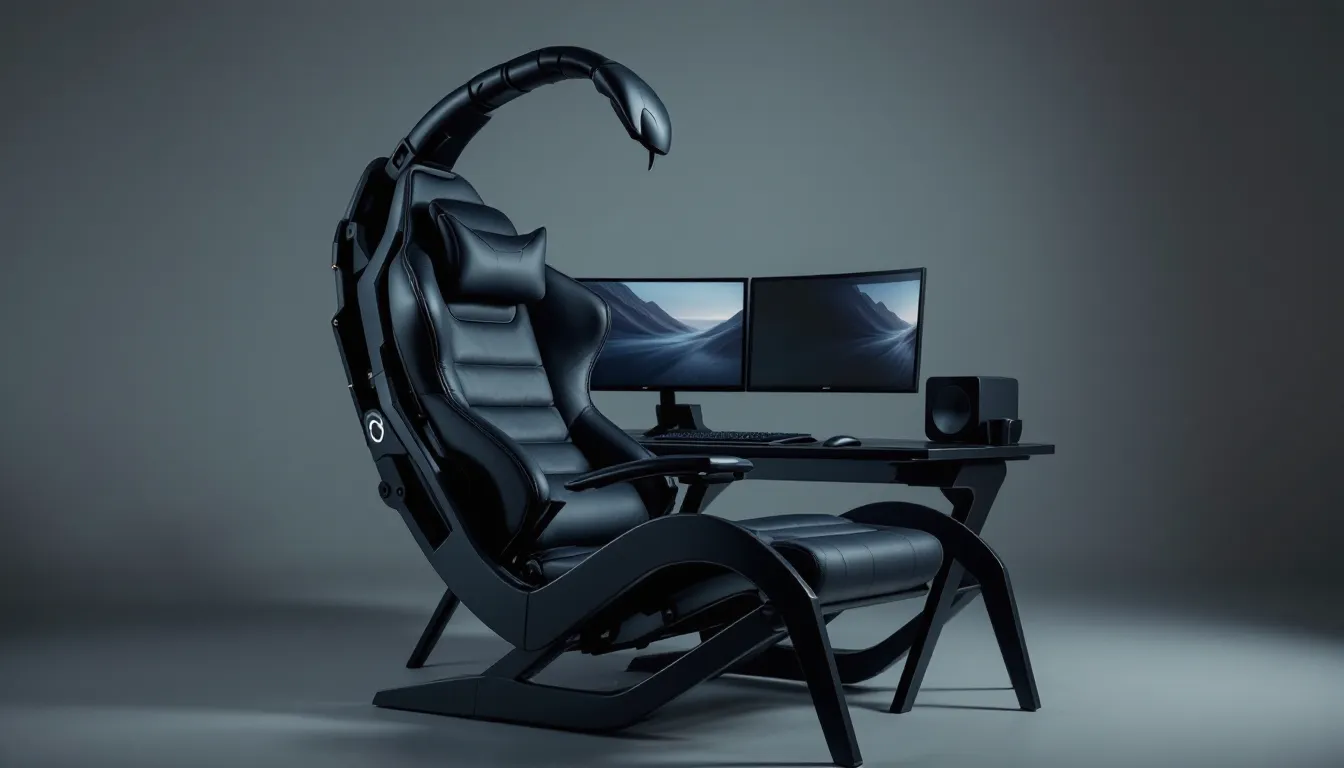
The first time you see a scorpion gaming chair, you’ll probably do a double-take. These futuristic cockpit workstations look like something ripped from a sci-fi movie, curved metal frames, suspended monitors, and a zero-gravity reclining seat that cradles you while you game. But they’re not just about aesthetics. Scorpion chairs represent a radical rethinking of how gamers interact with their setups, prioritizing ergonomics and immersion in ways traditional desks and gaming chairs simply can’t match.
In 2026, scorpion gaming chairs have evolved from niche curiosities into legitimate options for serious gamers, sim racers, and anyone who spends extended hours at their PC. They’re not cheap, and they definitely aren’t for everyone, but for those who’ve tried one, the experience is hard to replicate. Whether you’re grinding ranked matches, flying virtual missions, or diving into marathon horror game sessions, the scorpion chair’s unique design offers tangible advantages that go beyond the initial wow factor.
This guide breaks down everything you need to know: what makes these chairs tick, which models stand out in 2026, and whether a scorpion chair actually makes sense for your gaming setup and budget.
Key Takeaways
- A scorpion chair gaming setup combines a reclining seat with integrated monitor mounts and peripheral platforms into one unified cockpit-style workstation designed for superior ergonomics and immersion.
- Zero-gravity recline positions (typically 128–135 degrees) maintain your spine’s natural S-curve, reduce pressure on spinal discs, and improve circulation during extended gaming sessions compared to traditional desk postures.
- Scorpion gaming chairs excel for sim racing, flight simulators, horror games, and story-driven titles where immersion and comfort matter most, but may not suit low-sensitivity competitive FPS players or multi-tasking workflows.
- Mid-range scorpion chair gaming options ($1,500–$2,500) offer the best value, providing solid build quality and genuine ergonomic benefits without the premium price tag of flagship models ($3,000–$6,500+).
- Before investing, confirm you have 10–15 square feet of dedicated floor space, compatible VESA-mount monitors, and realistic expectations about the chair’s permanent placement and single-user optimization.
- Proper maintenance including regular upholstery care, hydraulic lubrication, and mechanical adjustments extends the lifespan to 5–10+ years, making the initial investment worthwhile for serious gamers.
What Is a Scorpion Gaming Chair?
A scorpion gaming chair is a full cockpit workstation that surrounds the user with monitors, peripherals, and a reclining seat, all mounted on a single structural frame. The name comes from the distinctive silhouette: when reclined, the overhead monitor arm curves over the user like a scorpion’s tail. Unlike traditional gaming chairs that sit at a desk, scorpion chairs are self-contained units where everything, keyboard tray, mouse platform, monitor mounts, and seat, moves together.
The design traces its roots back to professional sim racing rigs and industrial workstation concepts, but modern scorpion chairs have been adapted specifically for gaming. They typically support one to three monitors (or a single ultrawide), with the screens positioned overhead or at eye level depending on recline angle. Most models feature extensive adjustability for seat position, monitor height, and peripheral placement.
Understanding the Scorpion Chair Design Philosophy
The core philosophy behind scorpion chairs is eliminating strain through optimal positioning. Traditional desk setups force your spine into a 90-degree angle, your neck to tilt forward, and your arms to extend horizontally. Over hours of gaming, this adds up to fatigue, discomfort, and poor circulation.
Scorpion chairs flip that script. The zero-gravity recline (usually between 120-170 degrees) distributes your body weight across the seat, reducing pressure on your lower back and spine. Monitors suspend directly in your natural line of sight, so your neck stays neutral. Keyboard and mouse platforms adjust independently, keeping your wrists and forearms properly aligned without reaching forward.
This isn’t just comfort for comfort’s sake, it’s about maintaining peak performance during long sessions. When you’re comfortable, you stay focused. When your posture is neutral, reaction times improve and eye strain decreases. The design philosophy treats gaming as an athletic activity that demands proper ergonomic support.
How Scorpion Chairs Differ from Traditional Gaming Chairs
Traditional gaming chairs are essentially office chairs with aggressive styling, lumbar support, adjustable armrests, tilt mechanisms. They’re designed to sit at a desk, facing forward, with peripherals on a separate surface. You’re still working against gravity, and your setup components are independent.
Scorpion chairs integrate everything into one frame. When you recline, the monitors recline with you. The keyboard and mouse platforms stay in position relative to your body, not the floor. This unified movement is the fundamental difference: your entire gaming environment adjusts as a single unit.
Traditional setups excel at flexibility, you can swap desks, rearrange monitors, adjust height independently. Scorpion chairs sacrifice that modularity for a locked-in, optimized experience. You can’t easily switch between gaming and productivity tasks, and you definitely can’t share the setup with someone who has drastically different body dimensions without significant readjustment.
Space requirements also diverge sharply. A traditional gaming chair and desk might occupy 6-8 square feet. A fully reclined scorpion chair can demand 12-15 square feet, plus clearance for the overhead monitor arm. That footprint is non-negotiable.
Key Features of Scorpion Gaming Chairs
Modern scorpion gaming chairs pack a surprising amount of engineering into their distinctive frames. While specific features vary by model and price point, certain elements define the category and separate premium options from budget alternatives.
Zero Gravity Reclining Positioning
Zero gravity recline is the marquee feature. Borrowed from NASA’s neutral body posture research, this recline angle (typically 128-135 degrees) minimizes stress on the spine and joints by distributing weight evenly. In a zero-gravity position, your legs elevate slightly above heart level, improving circulation during extended sessions.
Most scorpion chairs offer manual or hydraulic recline adjustment with locking positions. Premium models include electric motors with memory presets, save your racing sim angle, your FPS grind position, and your chill browsing setup, then switch between them with a button. The recline mechanism’s smoothness and stability matter more than the range: cheap hydraulics can drift under load or feel jerky when adjusting.
The recline also affects your field of view. At steeper angles, monitors need to reposition overhead to stay in your natural sightline. Well-designed scorpion chairs account for this with linked adjustments or intuitive monitor arms.
Multi-Monitor Support and Mounting Systems
Monitor mounting is where build quality becomes obvious. Entry-level scorpion chairs support single monitors up to 32 inches, while premium models handle triple 27-inch displays or single 49-inch ultrawides. The mounting system needs to hold screens rock-steady, any wobble or sag ruins immersion and causes eye strain.
Look for VESA-compatible mounts (typically 75x75mm or 100x100mm) with tool-free adjustment for height, tilt, and swivel. The overhead arm should telescope or pivot to accommodate different recline angles without forcing awkward viewing angles. Weight limits matter: a triple-monitor setup with 27-inch panels can push 45-50 pounds, and the mount needs to handle that without flexing.
Cable management integrates directly into the monitor arm on better models, channels or clips route HDMI, DisplayPort, and power cables cleanly from the seat base to the screens. Sloppy cable runs don’t just look bad: they create snag points when adjusting position.
Integrated Keyboard and Mouse Platforms
The peripheral platforms make or break usability. Unlike a desk where you have unlimited horizontal space, scorpion chairs provide fixed surface areas for your keyboard and mouse. These platforms need to be large enough for your peripherals plus wrist movement, but compact enough not to interfere with recline or entry/exit.
Most designs use a suspended keyboard tray (12-18 inches wide) and a separate articulating mouse platform. The mouse surface should adjust independently for height and angle, your mouse sensitivity and DPI settings influence ideal positioning. For low-sens FPS players who need wide swipes, platform size becomes a limiting factor. Some premium models offer extended mouse decks (10×14 inches or larger) to accommodate those sweeping movements.
Platform materials range from padded vinyl to perforated metal. Padded surfaces feel comfortable but wear faster and can introduce minor input lag on optical mice. Hard surfaces offer better tracking consistency but may require a mousepad.
RGB Lighting and Customization Options
Futuristic gaming chair aesthetics demand RGB, and scorpion chairs deliver. Most 2026 models include programmable LED strips along the frame, under the seat, or integrated into the monitor arm. Control methods vary from physical remotes to PC software sync (via USB) that coordinates with your existing RGB ecosystem through Razer Chroma, Corsair iCUE, or similar platforms.
Beyond lighting, customization extends to upholstery materials (PU leather, breathable mesh, or fabric), frame colors (black, white, red, or custom powder coating), and accessory mounts. Premium options include USB hubs built into the armrests, headphone hangers, cup holders, and even subwoofer mounting points for full surround sound integration.
The best customization, though, is functional: adjustability in every dimension. Seat depth, armrest width, monitor distance, platform height, if it moves, you can dial it in. That adjustability matters because scorpion chairs don’t accommodate sharing well: each user needs to configure the entire rig to their body.
Benefits of Using a Scorpion Chair for Gaming
The scorpion chair’s design delivers specific, measurable advantages for gaming scenarios. These aren’t subjective improvements, they’re biomechanical benefits backed by ergonomic research and real-world testing by gamers who’ve logged thousands of hours in these rigs.
Enhanced Ergonomics and Posture Support
Spinal alignment is the primary health benefit. Traditional desk postures compress the lumbar spine and round the shoulders forward, the classic gamer hunch. Over years, this contributes to chronic back pain, herniated discs, and postural dysfunction.
Scorpion chairs maintain the spine’s natural S-curve. The reclined position opens the hip angle beyond 90 degrees, reducing pressure on spinal discs. Your shoulders rest back instead of hunching forward, preventing the rounded upper back that plagues desk workers. The elevated leg position reduces lower back strain and improves venous return from the legs.
For gamers with existing back issues, the difference is noticeable within a single session. No more shifting positions every 20 minutes trying to find comfort. The chair supports your body’s natural resting state, so discomfort doesn’t accumulate over time. This isn’t marketing fluff, it’s the same principle behind zero-gravity recliners used for medical recovery and long-duration spaceflight.
Immersive Gaming Experience and Focus
Immersion isn’t just about graphics, it’s about eliminating distractions and environmental friction. Scorpion chairs create a cocoon effect where your entire field of view is dominated by screens. Peripheral distractions fade because the monitors arc around you, and the reclined position narrows your peripheral awareness to the gaming environment.
This setup shines in games that demand sustained concentration: competitive FPS ranked grinds, sim racing endurance events, or narrative horror games where atmosphere matters. Players report a distinct sense of “presence” in scorpion setups that’s harder to achieve at a traditional desk, where room elements constantly intrude on peripheral vision.
The physical act of reclining also signals psychological shifts. When you lean back in a scorpion chair, you’re committing to the session, no quick Alt+Tab multitasking, no glancing at your phone on the desk. For better or worse, you’re locked in.
Reduced Neck and Eye Strain During Extended Sessions
Monitor positioning in scorpion chairs directly addresses two common gaming ailments: neck strain from looking down or up at poorly placed screens, and eye fatigue from improper viewing distances.
In a traditional setup, monitors sit on a desk, forcing you to look slightly downward. Even a few degrees of downward neck tilt, maintained for hours, strains the cervical spine and fatigues neck muscles. Scorpion chairs position monitors at true eye level or slightly below (20-30 degrees depending on recline), keeping your neck in a neutral, relaxed position.
Viewing distance also optimizes naturally. Most scorpion chairs suspend monitors 24-30 inches from your eyes, the ideal range for 24-27 inch displays. This reduces eye strain compared to sitting too close (common with desk setups where space is tight) or too far (losing detail and causing squinting). Competitive gamers often benefit from player-specific display configurations that can be fine-tuned on scorpion chairs without compromising ergonomics.
The cumulative effect over marathon sessions is significant. Four-hour gaming blocks that would normally leave you stiff and bleary-eyed become manageable without breaks.
Top Scorpion Gaming Chairs Available in 2026
The scorpion chair market has matured significantly, with options spanning from premium flagship models to surprisingly capable budget alternatives. Here’s where the landscape stands as of early 2026.
Premium Scorpion Workstation Models
IW-SK Imperator Works Scorpion remains the gold standard. The latest IW-SK Pro version supports up to three 32-inch monitors, includes electric recline with four memory presets, and features aerospace-grade aluminum construction rated for 350 lbs. The hydraulic monitor arm adjusts with fingertip pressure and locks solid under load. Scorpion gaming chair price for this model runs $3,200-$3,800 depending on customization (upholstery, lighting, accessories). It’s expensive, but the build quality justifies the cost for serious enthusiasts.
CluvensScorpion CKC-X1 competes directly with Imperator on features but undercuts slightly on price ($2,800-$3,200). It includes integrated USB 3.2 hubs, Qi wireless charging pads in the armrests, and surprisingly good RGB sync via PC software. The motorized recline is marginally noisier than Imperator’s, but functionally equivalent. Weight limit sits at 330 lbs.
Predator Thronos Air from Acer targets the ultra-premium segment ($6,500+). It’s less a chair than a full gaming environment: built-in subwoofer, haptic feedback in the seat, and compatibility with VR tether management. The futuristic gaming chair aesthetic peaks here, brushed metal, massive LED panels, glass side panels showing internal cable routing. It’s overkill for most, but if budget isn’t a constraint, it delivers the most complete package.
Mid-Range Options for Budget-Conscious Gamers
GTRacing GT-Scorpion dominates the mid-tier ($1,200-$1,500). It simplifies the premium formula: manual recline instead of electric, single or dual monitor support, and basic cable management. Build quality is solid but not premium, steel frame with some wobble under aggressive movement. Weight capacity drops to 280 lbs. It’s the sweet spot for gamers who want the scorpion experience without dropping three grand.
Respawn RSP-110 Cockpit ($999-$1,299) sacrifices some adjustability for affordability. The recline range is narrower (110-140 degrees), and the monitor arm supports only single displays up to 32 inches. But the seated experience remains comfortable, and assembly is significantly simpler than pricier competitors. Good entry point if you’re testing whether scorpion chairs suit your workflow.
OFM Essentials Racing Style Cockpit ($850-$1,050) blurs the line between sim racing rig and scorpion chair. It’s built primarily for racing wheels and pedals but includes a keyboard/mouse conversion kit. The recline mechanism is basic, and there’s no RGB or premium upholstery. Still, for sim racers who occasionally play other genres, it’s a cost-effective dual-purpose option.
Compact Scorpion Chairs for Limited Spaces
Full-size scorpion chairs demand serious real estate, but compact alternatives exist for tighter spaces.
Cougar Ranger ($1,100-$1,400) shrinks the footprint by 25% compared to standard models. The monitor arm folds down when not in use, and the overall recline range is shallower to reduce rear clearance requirements. It handles single monitors up to 34 inches and includes decent peripheral platforms. Best for apartments or shared rooms where a permanent 15-square-foot gaming pod isn’t feasible.
Ficmax Cockpit Compact ($799) goes even smaller, almost too small for users over 6 feet tall or above 250 lbs. The monitor support is fixed (non-adjustable), and the mouse platform feels cramped for low-sensitivity players. But it folds partially for storage and works in spaces as tight as 8×8 feet. Compromises are real, but it’s the only way some gamers can access scorpion ergonomics.
What to Consider Before Buying a Scorpion Gaming Chair
Scorpion chairs aren’t impulse purchases. They’re investments that reshape your entire gaming setup, and several critical factors determine whether you’ll love or regret the decision.
Space Requirements and Room Layout
Measure twice, order once. A fully reclined scorpion chair needs 10-15 square feet of dedicated floor space, plus an additional 2-3 feet of clearance on all sides for safe entry/exit and monitor arm swing. In smaller rooms, you’ll need to position the chair carefully to avoid the monitor arm hitting walls or furniture when adjusting recline.
Ceiling height matters too, most scorpion chairs sit low to the ground (seat height 18-24 inches), but the overhead monitor arm can extend 5-6 feet above floor level at certain angles. Standard 8-foot ceilings work fine: anything lower might cause clearance issues with triple-monitor setups.
Doorway access is a sneaky obstacle. Scorpion chairs ship partially disassembled, but the base frame section can still be 4-5 feet long and 3 feet wide. Narrow doorways or tight stairwells become problems. Check shipping dimensions before ordering if you’re in an apartment or upstairs room.
Weight Capacity and Build Quality
Manufacturer weight ratings are real, exceed them and you risk frame flex, hydraulic failure, or worse. Most scorpion chairs range from 250-350 lbs capacity. Add your body weight plus the weight of mounted monitors and peripherals: those triple 27-inch setups add 50+ lbs of load.
Build quality correlates strongly with price. Premium models use aluminum frames with reinforced joints and industrial-grade hydraulics. Budget options rely on steel (heavier) or mixed materials that may wobble slightly under movement. Read reviews specifically mentioning stability, if multiple users report creaking or swaying, that’s a red flag.
Upholstery durability also varies. PU leather looks sleek but cracks after 2-3 years of daily use. Breathable mesh or fabric lasts longer and stays cooler but may stain more easily. For gaming peripherals and accessories, independent reviews from technology testing experts often provide long-term durability insights that manufacturer specs don’t.
Monitor Compatibility and Mounting Flexibility
Confirm VESA compatibility for your monitors before buying. Most modern displays use 75x75mm or 100x100mm VESA patterns, but some ultrawides or specialty gaming monitors use non-standard mounts. If your monitor isn’t VESA-compatible, you’ll need an adapter, or a different monitor.
Check weight limits per monitor arm. A 32-inch gaming monitor weighs 15-20 lbs: ultrawide 49-inch models push 30+ lbs. The scorpion chair’s mounting system must handle that load without sagging. Cheaper chairs specify weight limits per arm but may still flex under max-rated loads.
Curved vs. flat monitors introduce mounting considerations. Curved ultrawides benefit most from scorpion setups because the screen arcs naturally around your reclined field of view. Flat triple-monitor arrays work well but require careful angling to avoid side screen distortion. The chair’s monitor arm needs enough swivel and tilt range to accommodate your preferred configuration.
Price Range and Budget Planning
Scorpion gaming chair price spans a massive range: $800 for basic compact models to $6,500+ for flagship systems. Budget at least $1,500 for a worthwhile mid-tier option that won’t feel like a compromise within six months.
Don’t forget hidden costs:
- Monitors (if not already owned): $300-$800+ each for quality gaming displays
- Monitor mounts/adapters: $50-$150
- Extended warranty: $150-$300 (recommended for hydraulic/electric components)
- Accessories: USB hubs, cable sleeves, additional lighting ($50-$200)
- Delivery/assembly: Some retailers charge $100-$200 for professional setup
Financing options exist through manufacturers and retailers, but consider total cost carefully. A $3,000 scorpion chair on 24-month financing becomes $3,400+ with interest. If budget is tight, waiting and saving beats settling for a compromised model you’ll want to upgrade.
Setting Up Your Scorpion Gaming Chair
Assembling and configuring a scorpion chair is more involved than typical gaming furniture, but most gamers can handle it with patience and basic tools. Here’s what actually works.
Assembly Tips and Tools Required
Plan for 2-4 hours of assembly time, depending on model complexity. Premium chairs with electric motors and integrated lighting take longer: basic manual models assemble faster. You’ll need:
- Allen keys/hex wrenches (usually included, but a full metric set helps)
- Phillips and flathead screwdrivers
- Adjustable wrench or socket set
- Wire cutters/strippers (if customizing cable management)
- Level (smartphone app works fine)
- Second person (not mandatory but helpful for monitor arm attachment)
Follow the manual’s order exactly, scorpion chairs use nested assembly where later steps depend on earlier positioning. Common mistakes include:
- Over-tightening bolts during initial assembly (leave them loose until everything aligns, then tighten in final pass)
- Installing monitor arm before seat (makes seat recline testing impossible)
- Ignoring cable routing channels (trying to add cables after assembly is nightmare fuel)
Test recline and adjustment mechanisms before mounting monitors. Run through the full range of motion unloaded to confirm smooth operation and identify any binding or unusual resistance.
Optimal Monitor Positioning and Viewing Angles
Start with the 20-30 inch viewing distance rule for your monitor size. For 27-inch displays, aim for 26-28 inches from your eyes to the screen at your primary recline angle. Use a tape measure and adjust the monitor arm accordingly.
Vertical positioning matters more than most gamers realize. The top of your monitor should sit at or slightly below eye level when you’re reclined in your preferred position. This keeps your gaze angled slightly downward (10-20 degrees), which is the natural resting position for eyes and reduces strain.
For triple-monitor setups, angle the side screens 20-30 degrees inward, creating a gentle arc. Don’t push beyond 30 degrees, severe angles cause geometric distortion at screen edges and reduce effective viewing area. Some users prefer flat arrays: experiment to find what feels natural.
Tilt adjustment compensates for recline angle. At steep reclines (150+ degrees), you might need to tilt monitors downward 10-15 degrees to maintain perpendicular viewing angles. This is where electric monitor arms with memory presets shine, save configurations for different recline positions.
Cable Management Solutions
Cable chaos is the scorpion chair’s biggest aesthetic and functional enemy. Start clean and you’ll thank yourself later.
Route power cables separately from data cables when possible to reduce electromagnetic interference (rarely an issue but worth avoiding). Use the frame’s built-in channels first, most scorpion chairs include cable runs along the main structural members.
For exposed sections:
- Velcro cable ties > zip ties (you’ll need to adjust/add cables later)
- Braided cable sleeves for bundling multiple runs together
- Adhesive cable clips along the underside of platforms and monitor arm
Leave some slack loops near adjustment points. If cables pull taut when you recline or adjust monitor position, they’ll eventually fray or pull connectors loose. An extra 6-8 inches of slack at each joint prevents this.
Power management benefits from a mounted power strip or surge protector attached to the chair base. Route the single power cable to your wall outlet, keeping the chair mobile if you ever need to shift it. For setup guidance across various gaming configurations, detailed installation tutorials often cover the specific cable management challenges of complex gaming rigs.
Best Gaming Genres for Scorpion Chair Setups
Scorpion chairs don’t benefit every genre equally. Some games and playstyles leverage the ergonomic and immersive advantages: others gain nothing or even suffer from the setup limitations.
Racing and Flight Simulators
Sim racing is the scorpion chair’s natural habitat. The reclined position mirrors actual racing seats, and the immersive cockpit feel amplifies the simulation experience. Triple-screen setups with side monitors replicating peripheral vision work brilliantly here, head checks feel natural, and spatial awareness improves.
Many scorpion chairs designed for sim racing include compatibility with direct-drive wheel bases and load cell pedals. The frame’s structural integrity matters: high-torque wheels generate significant force, and wobbly frames destroy immersion and precision. Premium models rated for sim gear handle this: entry-level chairs may struggle.
Flight sims benefit similarly. The reclined position approximates aircraft seating (especially fighter jets or helicopters), and the overhead monitor positioning matches cockpit instrument panels. HOTAS (hands on throttle and stick) controllers mount easily on scorpion peripheral platforms. Games like DCS World, Microsoft Flight Simulator 2024, and Star Citizen reach their immersive peak in these setups.
One caveat: VR sim racing and flight still works better in traditional chairs due to the need to lean and move naturally. The scorpion chair’s reclined position limits that range of motion.
Competitive FPS and MOBA Games
This is where opinions split. Some competitive players swear by scorpion chairs: others consider them a handicap.
FPS games in scorpion setups work best for players who use moderate-to-high mouse sensitivity. If you play with low DPI (400-800) and make wide swipes for 180s, the limited mouse platform size becomes a problem. Extended mouse decks help, but you’re still more constrained than at a full desk.
For high-sens players (1600+ DPI, small wrist movements), the scorpion chair’s ergonomic advantages shine. Reduced fatigue over 4-6 hour practice blocks means more consistent aim in the later hours when stamina matters. The stable, neutral wrist position prevents the cumulative strain that degrades tracking precision.
MOBA and RTS players adapt more easily. These genres rely on keyboard hotkeys and precise but small mouse movements, both well-suited to scorpion platforms. The reclined position doesn’t hinder reaction times for these game types. Long ranked grinds in League of Legends, Dota 2, or StarCraft II benefit from the extended comfort.
Realistic expectation: a scorpion chair won’t make you aim better, but it can help you maintain peak performance longer. If you’re a casual FPS player prioritizing comfort over ranking up, it’s excellent. If you’re grinding for Radiant or Global Elite, test before committing, the setup might not suit your specific muscle memory and sensitivity.
Horror and Immersive Story-Driven Games
Scorpion chairs were made for this. Horror games rely on atmosphere, tension, and eliminating distractions, all strengths of the cockpit setup. When you’re reclined in a dark room, monitors arcing around your vision, the real world fades. Games like Resident Evil, Silent Hill, Amnesia, and indie horror titles hit harder.
The reclined position also reduces the urge to look away during intense moments, you’re physically committed to the screen position, no leaning back or glancing around the room to break tension.
Story-driven single-player games benefit from the same immersive quality. Red Dead Redemption 2, The Witcher 3, Cyberpunk 2077, Baldur’s Gate 3, games where you sink in for 3-4 hour play sessions, leverage the scorpion chair’s comfort. You’re not fighting the chair or adjusting position: you’re just absorbed in the game.
Multiplayer social games and streams are less ideal. The reclined position and overhead monitors make it awkward to interact with a webcam or check chat. Streaming from a scorpion chair usually requires a separate camera rigging solution.
Scorpion Chairs vs. Traditional Gaming Setups
Both setups have legitimate use cases. The question isn’t which is objectively better, it’s which fits your priorities, space, and gaming habits.
Pros and Cons Comparison
Scorpion Chair Advantages:
- Superior ergonomics for extended sessions (3+ hours)
- Immersive environment with reduced peripheral distractions
- Reduced neck and back strain compared to desk postures
- All-in-one adjustability, entire rig moves as a unit
- Impressive aesthetics and conversation-piece factor
Scorpion Chair Disadvantages:
- High cost ($800-$6,500 vs. $150-$500 for desk + chair)
- Massive footprint, requires dedicated space
- Limited flexibility, not ideal for multitasking or productivity work
- Mouse platform size constrains low-sensitivity FPS players
- Single-user optimization, difficult to share or adjust for multiple people
- Assembly complexity and potential maintenance needs
Traditional Setup Advantages:
- Lower cost and easier to upgrade incrementally
- Smaller footprint and easier room reconfiguration
- Better multitasking and productivity workflow integration
- Unlimited desktop space for peripherals, monitors, and gear
- Easier to share or adjust for multiple users
- Wide accessory compatibility (monitor arms, desk mounts, etc.)
Traditional Setup Disadvantages:
- Worse ergonomics over long sessions, inevitable posture drift
- More distractions from room environment and peripheral vision
- Cumulative strain on neck, back, and wrists during marathon gaming
- Monitor positioning limitations based on desk configuration
The trade-off is clear: scorpion chairs maximize comfort and immersion at the cost of flexibility and space. Traditional setups prioritize versatility and cost-effectiveness but demand better posture discipline.
Who Should Invest in a Scorpion Chair?
Scorpion chairs make sense if you:
- Game 15+ hours weekly in extended sessions (3+ hours at once)
- Have dedicated space for a permanent gaming station
- Prioritize sim racing or flight sims where the cockpit feel enhances the experience
- Experience back or neck pain with traditional desk setups
- Play immersive single-player or horror games regularly
- Have the budget without compromising GPU, CPU, or monitor quality
- Value the aesthetic and want a showpiece setup
Stick with traditional setups if you:
- Need versatility for work, content creation, or mixed tasks
- Play primarily fast-paced competitive FPS with low mouse sensitivity
- Share your gaming space with family or roommates
- Have limited room space (under 100 square feet)
- Prefer upgrading incrementally rather than all-at-once investments
- Play in short bursts (under 2 hours) where ergonomic benefits matter less
There’s also middle ground: high-quality ergonomic office chairs ($500-$1,000) paired with articulating monitor arms can deliver much of the ergonomic benefit at half the cost and a fraction of the footprint.
Maintenance and Care for Your Scorpion Gaming Chair
A well-maintained scorpion chair lasts 5-10+ years. Neglect basic upkeep and you’ll face premature wear, hydraulic failure, or structural issues. Here’s what actually matters.
Cleaning and Upholstery Care
PU leather upholstery requires regular conditioning to prevent cracking. Every 2-3 months, wipe down with a slightly damp microfiber cloth, then apply leather conditioner (Lexol and Chemical Guys are solid options). Avoid harsh cleaners or excessive water, PU leather’s protective coating degrades faster than genuine leather.
For stains, act immediately. Blot (don’t rub) with a damp cloth. For stubborn marks, use a small amount of mild soap diluted in water, then wipe clean and dry thoroughly. Never use bleach or ammonia-based cleaners.
Mesh or fabric upholstery benefits from light vacuuming every few weeks to prevent dust buildup. Spot clean with upholstery cleaner or diluted laundry detergent. Some mesh seat covers are removable and machine-washable, check your manual.
Frame and structural cleaning requires less frequency. Dust the metal frame quarterly with a microfiber cloth or compressed air. Check for loose fasteners during cleaning, vibration from gaming and adjustments can work bolts loose over time. Tighten any that have backed out.
Monitor arms and peripheral platforms accumulate dust and grime. Wipe down with isopropyl alcohol (70% works fine) to remove oils from hands and accumulated dirt. Don’t spray liquid directly on mechanical parts: apply to cloth first.
Mechanical Adjustments and Lubrication
Hydraulic systems require periodic attention. Most scorpion chair hydraulics are sealed units, but pivot points and attachment brackets benefit from light lubrication every 6-12 months. Use silicone spray or white lithium grease on pivot pins and adjustment mechanisms. Wipe away excess, you want a thin coat, not dripping grease that attracts dust.
If recline becomes stiff or jerky, the hydraulic cylinder may need replacement. This is normal wear after 3-5 years of daily use. Replacement cylinders run $50-$150 depending on model: many manufacturers sell them as replacement parts. Installation typically requires basic tools and 30-60 minutes.
Monitor arm joints should move smoothly with moderate resistance. If an arm drifts or won’t hold position, tighten the tension adjustment (usually an Allen screw at the joint). If it’s too stiff, loosen slightly. Finding the sweet spot where arms hold monitors firmly but adjust with light pressure is key.
Cable management check: Every six months, inspect cable routing for fraying or stress points. Replace any damaged cables before they fail mid-session. Add cable slack if you notice tension when adjusting recline or monitor position.
Long-term, expect to replace upholstery (3-5 years), hydraulic cylinders (4-6 years), and possibly monitor arm components (5-7 years) depending on use intensity. Factor these maintenance costs into your total ownership budget, a $2,500 chair might need $300-$500 in parts over a decade, which is still reasonable for a decade of daily use.
Conclusion
Scorpion gaming chairs sit at the intersection of ergonomic engineering, immersive design, and pure gaming enthusiasm. They’re not for everyone, the cost, space requirements, and single-purpose nature make them a niche product. But for gamers who spend serious hours in front of screens, deal with desk-related pain, or simply want the most immersive setup possible, they deliver measurable benefits.
The market in 2026 offers more choice than ever, from budget-friendly options under $1,000 to ultra-premium cockpits pushing $6,000. The sweet spot for most gamers sits around $1,500-$2,500, where you get solid build quality, genuine ergonomic benefits, and enough adjustability to dial in your perfect position.
Before pulling the trigger, honestly assess your space, gaming habits, and whether the scorpion chair’s strengths align with how you actually game. Test one if possible, some retailers and gaming cafes now offer hands-on demos. What looks cool in photos might not suit your playstyle, and what seems excessive might transform your daily sessions.
If you decide a scorpion chair fits your setup, you’re not just buying furniture, you’re investing in a gaming environment that prioritizes your long-term comfort and performance. That’s worth considering, even if the price tag seems steep at first glance.


